Task Palette
The palette on the left of Studio lists every task you can use, grouped by category. Each category can be expanded or collapsed with its arrow, and the search bar at the bottom filters tasks by name.
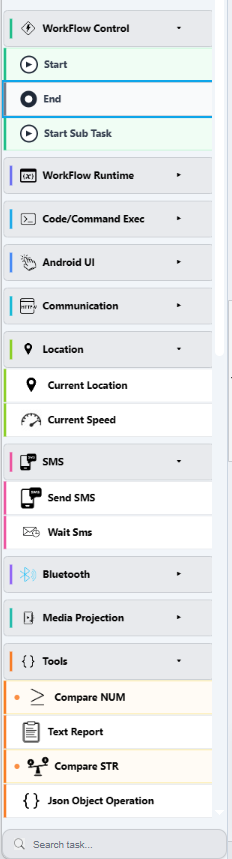
To use a task, drag it from the palette onto the canvas, then connect it to the rest of the workflow. Click it to configure it in the Task Configuration panel.
Categories
The palette groups tasks the same way as the Tasks overview, with one naming difference: the palette's Code/Command Exec group is the same as the nav's System category.
| Palette category | Tasks overview page |
|---|---|
| Workflow Control | Workflow Control - Start, End, Start Sub Task |
| Workflow Runtime | Workflow Runtime - Set Variable, Exception |
| Code/Command Exec | System - Cmd Stage, Java Code |
| Android UI | Android UI - element tasks, Intent, Automator Series |
| Communication | Communication - HTTP Request, DNS Lookup, Download/Upload File, Iperf3 |
| Location | Location - Current Location, Current Speed |
| SMS | SMS - Send SMS, Wait SMS |
| Bluetooth | Bluetooth - Connect, Disconnect, Pairing, Scanner, Read/Write Characteristic |
| Media Projection | Media Projection - Ask Projection Permission, Screen OCR |
| Tools | Tools - Compare Number, Compare Strings, Text Report, JSON Object Operation |
Note
The palette also scrolls to more categories below the ones shown in the screenshot (Time, Device Admin, Arithmetic, Battery...) - open the Tasks overview for the full, documented list of every task and its parameters.
What's next
- Tasks overview - every task, documented with its parameters
- Create a Workflow - building a workflow end to end, including variables